Getting started
Start with one check. You do not need a container build, Kubernetes cluster, release token, or deployment configuration for this example.
Before you start
- Use a GitLab.com project where you can commit files and run pipelines.
- Enable a runner that can run container-image jobs and download public images
from
registry.gitlab.com. - For self-managed GitLab, first follow catalog setup. Component includes below resolve on your own GitLab host; they do not import a catalog from another instance.
Run your first check
-
Create
example.yamlin the repository root:---message: Hello from CI Tools -
Create
.gitlab-ci.ymlin the same directory:include:- component: $CI_SERVER_FQDN/xrow-public/ci-tools/common@stable- component: $CI_SERVER_FQDN/xrow-public/ci-tools/lint-yaml@stableinputs:path: .allow-failure: false -
Commit both files. Open the project's pipeline list and inspect
lint:yaml. A successful job means the discovered YAML files pass the configured checks. If the job stays pending, check runner availability and matching runner tags. -
To see a failed check, change the message to an unclosed quoted string, such as
message: "Hello, and commit. The job should report invalid YAML and fail the pipeline. Restore the valid file before continuing.
common supplies shared stages, images, and library configuration. lint-yaml
adds the YAML check. allow-failure: false makes that check required; it does
not add a build or deploy anything. See the YAML lint reference
for file discovery, configuration, and inputs.
Add only what you need
Keep the first check and add one capability at a time. Each component reference lists its inputs, prerequisites, and usage example.
| Your next goal | Component or guide | Additional preparation |
|---|---|---|
| Check Markdown or JSON | lint-markdown, JSON lint | Files to validate |
| Build a container | container | A Containerfile and registry access |
| Package a Helm chart | helm | A chart; check its test and cluster requirements |
| Publish documentation | Docusaurus | Documentation source and a publishing destination |
| Create versioned releases | semantic-release | Release conventions and an authorized GitLab token |
| Add deployment or review environments | deploy-helm, review | Cluster credentials and an environment-specific configuration |
Browse the component overview for other tasks. Read pipeline rules before adding path filters, schedules, or release-tag behavior. Keep all component includes on the same release; see version selection before pinning or upgrading.
How components are used?
All components are in the folder templates. Each individual pipeline reuses some parts of the components. Components are used with the GitLab include keyword as documented in the GitLab Component documentation.
Example:
include:
- component: $CI_SERVER_FQDN/xrow-public/ci-tools/common@stable
- component: $CI_SERVER_FQDN/xrow-public/ci-tools/container@stable
  inputs:
    name: myapplication
    path: .
Common variables
Some pipelines require GitLab variables
| Name | Default value | Required | Encoding | Description | Jobs related |
|---|---|---|---|---|---|
CI_DEBUG_TRACE | unset | no | boolean | Enables debug mode verbose output and credentials | All pipelines |
KUBECONFIG | unset | yes | file or text(base64) | Credentials to the Kubernetes clusters | All jobs that interact with Kubernetes |
GITLAB_TOKEN | null | yes | text | Credentials with access to GitLab API for changelog access | The semantic-release component |
GITHUB_TOKEN | unset | no | text, masked | Optional GitHub API and Composer credential; not used for image or Helm registry authentication. | PHP S2I and Renovate jobs |
CI_BOOTLOADER_TOKEN | null | no | text, unmasked | Credentials used in the bootloader to access the bash library, if private. Use a deployment token of the project. | All components and jobs |
Configure all container and OCI chart credentials through the central registry authentication guide.
More details can be found in each component documentation.
Artifact retention
Component jobs use bounded artifact expiration to prevent old pipelines from accumulating artifacts indefinitely. The standard retention period is one week. High-volume build and test artifacts may use a shorter period, while components that need a longer diagnostic window keep their documented explicit period.
Usage of a pipeline
Include the latest pipeline like s2i-php
include:
- component: $CI_SERVER_FQDN/xrow-public/ci-tools/common@stable
- component: $CI_SERVER_FQDN/xrow-public/ci-tools/s2i@stable
  inputs:
    name: myapplication
    type: php
    path: .
What pipeline version to use?
Depending on your use case you can choose between channel stable, main or a specific version like 4.80.1.
In general it is recommended to use channel stable or a pinned version with renovate updates. A pinned version is recommended for stability, but may have security implications, because of its outdated nature.
Using stable
- Create GitLab pipeline file
.gitlab-ci.yml:
include:
- component: $CI_SERVER_FQDN/xrow-public/ci-tools/common@stable
- component: $CI_SERVER_FQDN/xrow-public/ci-tools/s2i@stable
  inputs:
    name: myapplication
    type: php
    path: .
Using a pinned version
Mixing different versions of components is not recommended. Upgrade them all at once with renovate. Make sure to include a proper renovate configuration to keep the versions up to date like.
- Create a renovate runner, if not exists already
- Create
renovate.json
{
  "$schema": "https://docs.renovatebot.com/renovate-schema.json",
  "extends": [
    "gitlab>xrow-public/renovate-config"
  ]
}
- Create GitLab pipeline file
.gitlab-ci.yml:
include:
- component: $CI_SERVER_FQDN/xrow-public/ci-tools/common@4.114.0
- component: $CI_SERVER_FQDN/xrow-public/ci-tools/s2i@4.114.0
  inputs:
    name: myapplication
    type: php
    path: .
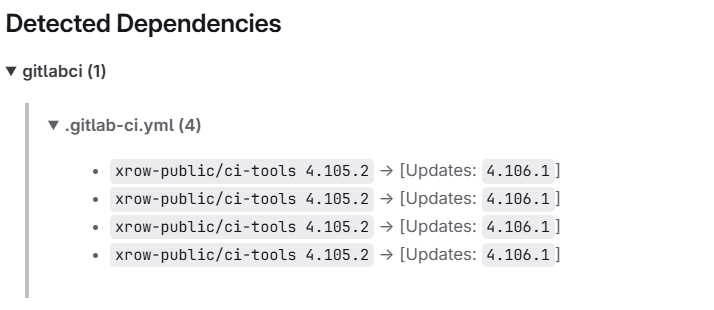
You can double check that renovate is working by looking at dependency dashboard.
Review apps
Git Lab Review apps are currently available for all pipelines.
You can start a review app from a merge context as well as from any stable branch. There are two jobs that control the state of a review app. review:start and review:stop. To start a review press the review:start job in your pipeline. The testing instance will be available about 15 minutes later. You will also find a list of current running review apps and review URLs under project->deployments->environments in GitLab.
Magic variables in source code
Those variables are available can be used in the source code and will be replaced when building a package.
| Name | Default value | Required | Encoding | Description | Usage |
|---|---|---|---|---|---|
CI_DOCUMENTATION_LATEST_TAG | unset | no | string | Represents the current software version of an artifact in semver format | All markdown files |
CI_CONTAINER_RELEASE_TAG | unset | no | string | Represents the current software version for a container tag | Container images |
CI_HELM_RELEASE_TAG | unset | no | string | Represents the current software version for a helm chart | Helm Charts |
Also see next chapter for more details on how the CI_CONTAINER_RELEASE_TAG and CI_HELM_RELEASE_TAG are generated.
How semantic-release and tagging works with component helm and container or buildah
Given you have a helm chart and a container pipeline.
include:
- component: $CI_SERVER_FQDN/xrow-public/ci-tools/common@stable
- component: $CI_SERVER_FQDN/xrow-public/ci-tools/container@stable
  inputs:
    name: mycontainer
- component: $CI_SERVER_FQDN/xrow-public/ci-tools/helm@stable
- component: $CI_SERVER_FQDN/xrow-public/ci-tools/semantic-release@stable
The helm chart is configured by the setting 0.0.0 and main to indicate the existence of automatic versioning.
apiVersion: v2
name: test
description: A Helm chart for Kubernetes
type: application
version: 0.0.0
appVersion: main
By default the containers are tagged according the following table
| Branch | Tagged | Resulting Tags |
|---|---|---|
main | yes | x.x.x (SemVer tag), latest, main, main.<commit_hash> |
main | no | main, main.<commit_hash> |
| merge request branch | no | <commit_hash> |
other-branch | yes | x.x.x (SemVer tag), other-branch, other-branch.<commit_hash> |
other-branch | no | other-branch, other-branch.<commit_hash> |
By default the helm are tagged according the following table. Because helm only allows SemVer. The appVersion from the Chart.yaml is the resulting tag from the container context.
| Branch | Tagged | Resulting Tags |
|---|---|---|
main | yes | x.x.x (SemVer tag), 0.0.0 ( meaning latest stable ) |
main | no | main, 0.0.0+main, 0.0.0+main.<commit_hash_short> |
| merge request branch | no | 0.0.0+<commit_hash_short> |
other-branch | yes | x.x.x (SemVer tag), 0.0.0+other-branch.<commit_hash_short>, 0.0.0+other-branch |
other-branch | no | other-branch.<commit_hash_short>, 0.0.0+other-branch |