Getting started
This article describes an introduction into CI/CD Pipeline Components.
Get started
Create a new project with 2 file.
A Containerfile:
FROM registry.access.redhat.com/ubi10/ubi:10.1-1773895909
A GitLab pipeline file .gitlab-ci.yml:
include:
- component: $CI_SERVER_FQDN/xrow-public/ci-tools/common@stable
- component: $CI_SERVER_FQDN/xrow-public/ci-tools/container@stable
  inputs:
    name: myapplication
    path: .
Now look the results from the pipeline builds. A new container has been pushed to the GitLab registry.
Possible next steps:
- Add a HELM chart with the
helmcomponent - Add a documentation with the
docusauruscomponent - Add a releases with the
semantic-releasecomponent - Add E2E tests with the
reviewcomponent
How components are used?
All components are in the folder templates. Each individual pipeline reuses some parts of the components. Components are used with the GitLab include keyword as documented in the GitLab Component documentation.
Example:
include:
- component: $CI_SERVER_FQDN/xrow-public/ci-tools/common@stable
- component: $CI_SERVER_FQDN/xrow-public/ci-tools/container@stable
  inputs:
    name: myapplication
    path: .
Common variables
Some pipelines require GitLab variables
| Name | Default value | Required | Encoding | Description | Jobs related |
|---|---|---|---|---|---|
CI_DEBUG_TRACE | unset | no | boolean | Enables debug mode verbose output and credentials | All pipelines |
KUBECONFIG | unset | yes | file or text(base64) | Credentials to the Kubernetes clusters | All jobs that interact with Kubernetes |
GITLAB_TOKEN | null | yes | text | Credentials with access to GitLab API for changelog access | The semantic-release component |
RH_REGISTRY_ACCOUNT | null | yes | text | Credentials with access to registry.redhat.io | All container components |
RH_REGISTRY_PASSWORD | null | yes | text | Credentials with access to registry.redhat.io | All container components |
CI_BOOTLOADER_TOKEN | null | no | text, unmasked | Credentials used in the bootloader to access the bash library, if private. Use a deployment token of the project. | All components and jobs |
More details can be found in each component documentation.
Usage of a pipeline
Include the latest pipeline like s2i-php
include:
- component: $CI_SERVER_FQDN/xrow-public/ci-tools/common@stable
- component: $CI_SERVER_FQDN/xrow-public/ci-tools/s2i@stable
  inputs:
    name: myapplication
    type: php
    path: .
What pipeline version to use?
Depending on your use case you can choose between channel stable, main or a specific version like 4.80.1.
In general it is recommended to use channel stable or a pinned version with renovate updates.
Using stable
- Create GitLab pipeline file
.gitlab-ci.yml:
include:
- component: $CI_SERVER_FQDN/xrow-public/ci-tools/common@stable
- component: $CI_SERVER_FQDN/xrow-public/ci-tools/s2i@stable
  inputs:
    name: myapplication
    type: php
    path: .
Using a pinned version
Mixing different versions of components is not recommended. Upgrade them all at once with renovate. Make sure to include a proper renovate configuration to keep the versions up to date like.
- Create a renovate runner, if not exists already
- Create
renovate.json
{
  "$schema": "https://docs.renovatebot.com/renovate-schema.json",
  "extends": [
    "gitlab>xrow-public/renovate-config"
  ]
}
- Create GitLab pipeline file
.gitlab-ci.yml:
include:
- component: $CI_SERVER_FQDN/xrow-public/ci-tools/common@4.114.0
- component: $CI_SERVER_FQDN/xrow-public/ci-tools/s2i@4.114.0
  inputs:
    name: myapplication
    type: php
    path: .
You can double check that renovate is working by looking at dependency dashboard.
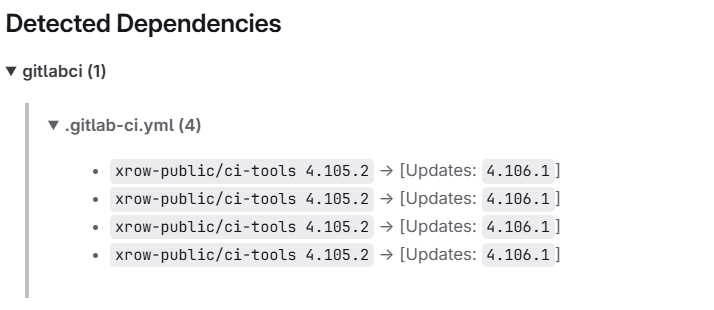
Review apps
Git Lab Review apps are currently available for all pipelines.
You can start a review app from a merge context as well as from any stable branch. There are two jobs that control the state of a review app. review:start and review:stop. To start a review press the review:start job in your pipeline. The testing instance will be available about 15 minutes later. You will also find a list of current running review apps and review URLs under project->deployments->environments in GitLab.
Magic variables in source code
Those variables are available can be used in the source code and will be replaced when building a package.
| Name | Default value | Required | Encoding | Description | Usage |
|---|---|---|---|---|---|
CI_DOCUMENTATION_LATEST_TAG | unset | no | string | Represents the current software version of an artifact in semver format | All markdown files |
CI_CONTAINER_RELEASE_TAG | unset | no | string | Represents the current software version for a container tag | Helm Charts |
CI_HELM_RELEASE_TAG | unset | no | string | Represents the current software version for a helm chart | Helm Charts |
Also see next chapter for more details on how the CI_CONTAINER_RELEASE_TAG and CI_HELM_RELEASE_TAG are generated.
How semantic-release and tagging works with component helm and container or buildah
Given you have a helm chart and a container pipeline.
include:
- component: $CI_SERVER_FQDN/xrow-public/ci-tools/common@stable
- component: $CI_SERVER_FQDN/xrow-public/ci-tools/container@stable
  inputs:
    name: mycontainer
- component: $CI_SERVER_FQDN/xrow-public/ci-tools/helm@stable
- component: $CI_SERVER_FQDN/xrow-public/ci-tools/semantic-release@stable
The helm chart is configured by the setting 0.0.0 and main to indicate the existence of automatic versioning.
apiVersion: v2
name: test
description: A Helm chart for Kubernetes
type: application
version: 0.0.0
appVersion: main
By default the containers are tagged according the following table
| Branch | Tagged | Resulting Tags |
|---|---|---|
main | yes | x.x.x (SemVer tag), latest, main, main.<commit_hash> |
main | no | main, main.<commit_hash> |
| merge request branch | no | <commit_hash> |
other-branch | yes | x.x.x (SemVer tag), other-branch, other-branch.<commit_hash> |
other-branch | no | other-branch, other-branch.<commit_hash> |
By default the helm are tagged according the following table. Because helm only allows SemVer. The appVersion from the Chart.yaml is the resulting tag from the container context.
| Branch | Tagged | Resulting Tags |
|---|---|---|
main | yes | x.x.x (SemVer tag), 0.0.0 ( meaning latest stable ) |
main | no | main, 0.0.0+main, 0.0.0+main.<commit_hash_short> |
| merge request branch | no | 0.0.0+<commit_hash_short> |
other-branch | yes | x.x.x (SemVer tag), other-branch+<commit_hash_short>, 0.0.0+other-branch |
other-branch | no | other-branch.<commit_hash_short>, 0.0.0+other-branch |
Additional helm hints
Given a values.yaml and the Chart.yaml above Bitnami common chart will inject the proper tag from the appVersion into your resulting container URI.
{{ include "common.images.image" ( dict "imageRoot" .Values.image "global" .Values.global "chart" .Chart ) }}
image:
  repository: path/to/image
  tag: ""
Given you desire in certain places in the current chart or container tags you can user the magic env variables CI_CONTAINER_RELEASE_TAG or CI_HELM_RELEASE_TAG.
image:
  repository: path/to/image
  tag: $CI_CONTAINER_RELEASE_TAG
apiVersion: v2
name: test
description: A Helm chart for Kubernetes
type: application
version: 0.0.0
appVersion: $CI_CONTAINER_RELEASE_TAG
Generate a GitLab SSH Key
GIT_SSH_KEY is a variable that can be used in pipelines with certain components to authenticate with GitLab using SSH keys for git operations.
To generate a GitLab SSH key, you can follow these steps:
- Execute the following command in your terminal to generate a new SSH key pair:
tmp_dir=$(mktemp -d)
ssh-keygen -t ed25519 -f $tmp_dir/your-key-filename -C "gitlab-deployment-key" -N ""
echo "Public Deployment key:"
cat $tmp_dir/your-key-filename.pub
echo "Private Deployment key:"
cat $tmp_dir/your-key-filename
- Create a variable
GIT_SSH_KEYof type file in your GitLab project and paste the private key content into it. Make sure to mark it as a file variable. - Add the public key as a deploy key in your GitLab repository with write access.